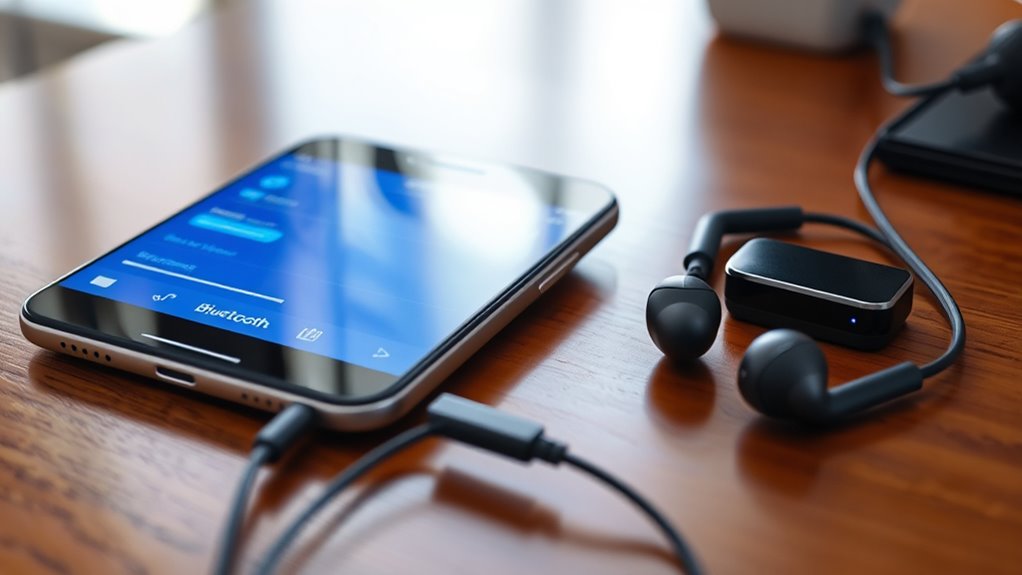
The key to setting up Bluetooth audio sync without lag lies in understanding device compatibility and optimal setup techniques that can transform your listening experience.
To set up Bluetooth audio sync without lag, start by choosing headphones that support low-latency codecs like aptX Low Latency, AAC, or LDAC. Confirm your device supports and has these codecs enabled, and verify the connection uses the best available codec. Keep your devices close with minimal obstacles, update firmware regularly, and consider using low-latency transmitters for peak performance. If you want to learn key tips for perfect sync, keep exploring these strategies further.
Choose Bluetooth headphones supporting aptX Low Latency, AAC, or LDAC codecs compatible with your device.
Ensure both source device and headphones have codecs enabled and are paired correctly for low latency.
Keep devices within close range and minimize obstacles to prevent interference and maintain a stable connection.
Update firmware and software regularly to improve codec support and connection stability.
Use low-latency transmitters and compatible apps with adjustable audio sync settings for optimal synchronization.
Listening to audio wirelessly can be convenient, but lag between sound and video often ruins the experience. If you’ve ever watched a movie or played a game with wireless headphones, you know how frustrating it is when the audio doesn’t sync perfectly with the visuals. Luckily, there are ways to set up Bluetooth audio so that lag is minimized or even eliminated. Starting with the right equipment is essential. Look for high-quality wireless headphones that support advanced audio codecs, such as aptX Low Latency, AAC, or LDAC. These codecs are designed to transmit audio more efficiently, reducing delay and improving sync accuracy. Not all Bluetooth devices support these codecs, so check your headphones and source device compatibility before purchasing.
Choose wireless headphones supporting aptX Low Latency, AAC, or LDAC for minimal audio lag.
Once you have the right hardware, pairing your wireless headphones correctly is the next step. Make sure your device supports the desired audio codecs and that they are enabled. Many devices automatically select the best codec available, but some allow you to manually set it via device settings or specialized apps. When pairing, ensure that your headphones are connected to the device using the codec that offers the lowest latency. This can often be confirmed in the Bluetooth settings or within the audio device info menu. Using the proper codec is vital because standard SBC (Subband Coding) often introduces noticeable lag, especially with video content.
To improve synchronization, keep your Bluetooth device within a close range of the source. Walls, furniture, and other electronic devices can interfere with the signal, causing delays or disconnections. Maintaining a clear line of sight and minimizing obstacles helps guarantee a stable connection that preserves audio timing. If you’re experiencing persistent lag, consider updating the firmware on your headphones and source device. Manufacturers often release updates that optimize codec support and connection stability, which can considerably enhance sync performance. Additionally, reducing interference from other wireless devices can help maintain a stable connection and better sync.
For the best experience, use media players or streaming apps that support low-latency audio modes. Some apps allow you to adjust audio sync settings or select specific output options to reduce lag. Additionally, if your device offers a dedicated audio transmitter with low-latency capabilities, invest in that. These transmitters are designed to work with compatible headphones and codecs, providing a more synchronized experience. Remember, achieving perfect sync may require some trial and error, but with the right gear, proper setup, and attention to details, you can enjoy wireless audio without the annoying lag that diminishes your entertainment experience.
Frequently Asked Questions
Can Bluetooth Audio Sync Issues Occur With All Device Brands?
Bluetooth compatibility and audio latency issues can occur with all device brands. While some brands improve Bluetooth technology to reduce lag, compatibility varies, so you might experience sync problems regardless of the brand. To minimize audio latency, make sure your devices support the latest Bluetooth standards, and consider using aptX Low Latency codecs. Regular updates and choosing devices with strong Bluetooth compatibility can help you achieve better audio sync.
Does Device Age Affect Bluetooth Lag Performance?
Did you know that over 60% of Bluetooth lag issues stem from outdated devices? Age does impact Bluetooth lag performance because older devices often struggle with device compatibility and supporting advanced audio codecs. When your device gets older, it might not efficiently process high-quality audio streams, leading to noticeable lag. Upgrading your device or ensuring it supports the latest audio codecs can substantially improve sync and reduce lag.
Are There Specific Bluetooth Profiles Better for Low Latency?
Yes, using Bluetooth codecs like aptX Low Latency or AAC can substantially reduce lag. These profiles are designed for low latency audio, making your sync smoother. To improve performance, ensure interference is minimized by avoiding crowded Wi-Fi channels and other electronic devices. Selecting devices that support these advanced codecs and interference mitigation features helps you enjoy near real-time audio, perfect for gaming or watching videos without frustrating delays.
How Does Environmental Interference Impact Bluetooth Audio Sync?
A chain is only as strong as its weakest link, and environmental interference can weaken your Bluetooth connection. Interference sources like Wi-Fi, microwaves, or other wireless devices disrupt signal stability, causing audio lag or dropouts. To keep your sync tight, minimize interference sources around your device, guarantee a clear line of sight, and stay within ideal range. This way, you enjoy seamless, lag-free audio every time.
Can Software Updates Improve Bluetooth Lag Problems?
Yes, software updates can improve Bluetooth lag problems. Firmware improvements often optimize device performance, reducing latency, while codec enhancements enhance audio quality and transmission speed. When you update your device’s firmware, you’re likely to experience smoother audio sync and less lag. Make sure you install the latest updates from your device manufacturer, as they frequently contain essential fixes and improvements that enhance Bluetooth audio performance.
Conclusion
Think of your Bluetooth connection as a delicate dance, where timing is everything. When you sync without lag, you’re guiding each step perfectly in harmony, transforming a simple rhythm into a seamless performance. With patience and the right settings, you become the conductor of your audio symphony, ensuring every beat echoes in sync. Remember, the harmony you create today sets the tone for a future where technology and music move effortlessly together.
Meta description: Meeting the bandwidth needs for 8K projection requires understanding high data rates and compression techniques—discover what it takes to achieve stunning clarity.
How to Share Your Projector Across Multiple Devices
Getting your projector to work seamlessly across multiple devices can be challenging—discover the simple steps to connect effortlessly and enjoy seamless sharing.