To quickly grasp HDR formats and tone mapping, understand that HDR10 uses static metadata for consistent brightness, Dolby Vision offers dynamic scene-by-scene adjustments, while HLG is broadcast-friendly, requiring no metadata. Tone mapping helps display HDR content on devices with limited dynamic ranges by compressing brightness without losing detail. Mastering these basics enables you to optimize your visuals efficiently. Keep exploring, and you’ll uncover more tips to enhance your HDR workflow and display compatibility.
Understand the differences between HDR10, Dolby Vision, and HLG, including metadata handling and device support.
Learn how tone mapping adjusts HDR content for displays with limited dynamic range, preserving detail and contrast.
Recognize calibration best practices to ensure consistent color accuracy across various HDR devices.
Identify common HDR artifacts like banding and color loss, and how proper adjustments can mitigate them.
Use industry-standard workflows and AI tools to streamline HDR content management and optimize visual quality.
Official Licensed Google TV Smart Projector, HAPPRUN 4K UHD Home Theater with Dolby Sound, Wi-Fi & Bluetooth, Built-in Streaming Apps, Compatible with Games Consoles & Smartphone, Indoor & Outdoor Use
[ Built-in Official Licensed Google TV ] - Without additional equipment, the smart projector can directly access Netflix,...
As an affiliate, we earn on qualifying purchases.
What Are HDR Formats and Why Do They Matter?
HDR formats are different ways of storing and displaying high dynamic range images and videos, allowing for richer colors and better contrast. They rely on specific metadata standards to communicate how content should be viewed, making certain that consistency across devices is maintained. This metadata guides your display’s tone mapping, which adjusts brightness and contrast levels for ideal viewing. Understanding these formats is essential because they influence your color grading process, helping you achieve accurate and vibrant visuals. Proper HDR formats ensure that your creative intent translates well across screens, preserving details in shadows and highlights. Selecting the appropriate format can also simplify content management, streamlining your workflow and reducing compatibility issues. Additionally, AI-powered data analytics can help optimize your content delivery by analyzing viewer preferences and device capabilities.
Akia Screens 100 Inch Fixed Frame Projector Screen, 16:9, 8K / 4K Ultra HD Projector & 3D Ready, Wall Mount CINEWHITE UHD-B Indoor Projection Screen for Home Theater, Cinema AK-FF100WH2
100-INCH FIXED FRAME DISPLAY: 100-inch diagonal fixed frame projector screen with a 16:9 aspect ratio. Viewable area measures...
As an affiliate, we earn on qualifying purchases.
Common Types of HDR Formats Explained
Have you ever wondered what makes different HDR formats unique? Each format offers specific benefits for color grading and display calibration. For example, HDR10 is widely supported and uses static metadata, making it simpler to implement. Dolby Vision, on the other hand, employs dynamic metadata, allowing for scene-by-scene adjustments that enhance color accuracy and contrast. HLG (Hybrid Log-Gamma) is designed for broadcast and doesn’t require metadata, simplifying display calibration. These formats differ in their bit depth, color gamut, and metadata handling, impacting how your device reproduces vivid colors and deep blacks. Understanding these distinctions helps you choose the right format for optimal color grading and calibration, ensuring your HDR content looks consistent across your display and matches your creative vision.
AAJK ALR Projector Screen, 4K Movie Projector Screen 16:9 HD Foldable Anti-Crease Portable Projector, Movies Screen for Home Theater Outdoor Indoor Support (120in Pro)
【Watch What You Want, When You Want!】 Remember when you could only really use your projector at night?...
As an affiliate, we earn on qualifying purchases.
How Does Tone Mapping Work in HDR?
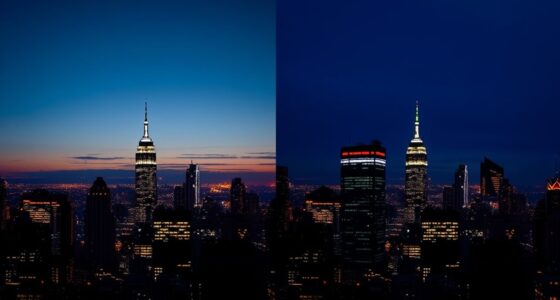
When your display can’t reproduce the full range of brightness and colors captured in HDR content, tone mapping steps in to adapt the image for ideal viewing. It works by compressing the high dynamic range into a form your screen can handle without losing vital details. During this process, color grading is applied to balance hues and ensure natural-looking images. Tone mapping analyzes the scene’s brightest highlights and darkest shadows, then redistributes luminance to preserve detail across the full dynamic range. This way, you get a vivid, lifelike picture without harsh clipping or dull areas. Fundamentally, tone mapping ensures that HDR content appears as close as possible to the creator’s intent, even on displays with limited dynamic range capabilities. Exploring the legacy of exploration reveals how innovation often involves adapting and overcoming limitations, highlighting the importance of dynamic range adaptation techniques in modern display technology. Additionally, understanding the subconscious power during sleep can help in optimizing how we prepare our minds for better visual experiences and overall perception. Furthermore, advances in color science continue to improve how tone mapping balances hues and brightness for more natural images.
Projector with WiFi and Bluetooth, [Native 1080P Upgrade 240 ANSI] KSAN Portable Projector, Mini Movie Projector for Outdoor Use, Bedroom Ceiling Video Projector Compatible with Phone/TV Stick/PC/PS5
【True Native 1080P Projector】Enjoy crystal-clear visuals with Native 1080P resolution, 240ASNI Lumen brightness and 2000:1 contrast ratio. The...
As an affiliate, we earn on qualifying purchases.
The Difference Between HDR10, Dolby Vision, and HLG
Are you wondering how HDR formats differ and which one might be best for your setup? HDR10, Dolby Vision, and HLG each have unique features affecting color grading and display calibration. HDR10 is the most common, offering static metadata for consistent brightness and colors. Dolby Vision uses dynamic metadata, adjusting settings scene-by-scene for richer visuals. HLG is designed for broadcast, blending HDR with traditional SDR signals without requiring metadata. Here’s a quick comparison:
Format
Metadata Type
Compatibility
HDR10
Static metadata
Widely supported
Dolby Vision
Dynamic metadata
Premium devices
HLG
No metadata
Broadcast-friendly
Understanding HDR formats helps you optimize your display calibration and enjoy vibrant, accurate colors. Additionally, understanding asset division principles can help you effectively navigate complex negotiations and legal considerations when dividing assets in various contexts. Recognizing the different types of HDR formats allows for better compatibility and content selection, ensuring you get the best viewing experience possible.
Choosing the Right HDR Format for Your Devices
Choosing the right HDR format depends on the devices you own and how you plan to use them. If your device supportsHDR10, it offers decent color accuracy and broad compatibility, making it ideal for most standard setups. Dolby Vision provides improved color accuracy and dynamic metadata, which enhances image quality, especially if your device is properly calibrated. HLG is suitable for live broadcasts and devices that prioritize compatibility over advanced features. To get the best experience, guarantee your devices are correctly calibrated to display HDR content accurately. This calibration helps maintain consistent color reproduction and contrast, making your HDR content look its best. Additionally, understanding cybersecurity vulnerabilities related to digital content can help you safeguard your devices and personal information. Awareness of potential digital content security risks is crucial in protecting your devices from cyber threats. Being aware of how narcissistic behaviors can influence digital interactions can also help you recognize manipulation or undue influence online. Incorporating knowledge about content formats can further optimize your viewing experience and prevent compatibility issues. For example, considering home furnishings like comfortable mattresses and temperature controls can improve your overall viewing environment, especially during long viewing sessions. Ultimately, selecting the right HDR format ensures excellent visual quality aligned with your device’s capabilities.
Tips for Effective Tone Mapping in Visual Content
Effective tone mapping transforms high dynamic range content into images that look natural and vibrant on your display. To achieve this, focus on good color grading to balance hues and maintain realistic skin tones and landscapes. Contrast enhancement is also key; it helps emphasize details in shadows and highlights, creating depth without losing image clarity. Start by adjusting tone curves carefully to preserve the original image’s intent while making bright areas pop and dark areas retain detail. Avoid overdoing contrast, as it can cause unnatural results. Use local tone mapping techniques when needed to adapt to specific areas of your scene, ensuring a balanced look overall. Additionally, understanding the capabilities of different HDR formats can help you choose the best approach for your content, ensuring optimal quality across devices. Incorporating knowledge of visual perception can further improve the effectiveness of your tone mapping process. Being aware of image editing principles can also assist in refining your adjustments and achieving more realistic results. Exploring HDR display technology can provide insights into how different devices interpret tone-mapped images for better consistency. Furthermore, utilizing AI content clustering can help organize your workflow and optimize your tone mapping projects for different content types. These tips help produce visually appealing content that retains its vibrancy and clarity across different devices.
Troubleshooting HDR and Tone Mapping Issues
When you’re working with HDR and tone mapping, issues like banding, color artifacts, or loss of detail can quickly disrupt the visual quality of your content. To troubleshoot effectively, start by reviewing your calibration techniques to guarantee your display accurately represents colors and luminance. Next, examine your color grading process; improper adjustments can cause unnatural hues or loss of detail in highlights and shadows. Finally, consider the following steps:
Ensure proper calibration and careful color grading to prevent banding and artifacts in HDR tone mapping.
Use high-quality tone mapping algorithms compatible with your HDR format.
Adjust your gamma and contrast settings to reduce banding.
Revisit calibration procedures to maintain consistency across devices.
Be aware of AI security vulnerabilities, as malicious manipulation of tone mapping algorithms could potentially introduce artifacts or distortions.
Regularly monitor your workflow for color accuracy to ensure consistent visual output.
Implementing proper HDR workflows can further enhance your troubleshooting process by aligning your setup with industry standards.
Frequently Asked Questions
How Do HDR Formats Impact Video Editing Workflows?
HDR formats substantially impact your video editing workflow by influencing color grading and metadata management. Different formats offer varying dynamic ranges and color depths, so you need to choose the right one for consistent results. Proper metadata management ensures your HDR content displays correctly across devices. By understanding these formats, you streamline your editing process, maintain color accuracy, and avoid technical issues during export and playback.
Can HDR Tone Mapping Be Automated for Consistent Results?
Yes, HDR tone mapping can be automated for consistent results. You can use software with automatic tone mapping features that analyze your footage and adjust brightness, contrast, and color to guarantee consistency in HDR output. This streamlines your workflow, saves time, and helps maintain uniform quality across projects. Automation makes it easier to achieve predictable, professional-looking HDR videos without manual adjustments every time.
What Hardware Specifications Are Necessary for Optimal HDR Playback?
For ideal HDR playback, make sure your hardware supports high dynamic range formats like HDR10 or Dolby Vision. You need a display with hardware compatibility for HDR, ideally with local dimming and wide color gamut. Calibrate your display regularly to maintain accurate colors and brightness levels. Also, use a graphics card or media device capable of processing HDR signals smoothly, guaranteeing seamless viewing without lag or color distortions.
Are There Compatibility Issues Between Different HDR Formats?
Yes, compatibility issues can arise between different HDR formats due to HDR format conversion challenges and color gamut compatibility. You might experience color shifts or reduced quality if your device struggles to interpret or switch between formats like HDR10, Dolby Vision, or HLG. To minimize issues, guarantee your hardware supports multiple HDR formats and maintains proper color gamut compatibility, enabling seamless playback across various HDR content.
How Does HDR Affect File Sizes and Streaming Bandwidth?
HDR increases file sizes due to higher data quality, which can pose compression challenges. When streaming, you need to optimize bandwidth because larger HDR files require more data transfer. By using efficient compression techniques and adaptive streaming, you can balance quality and bandwidth, ensuring smooth playback. Remember, optimizing HDR content for streaming involves managing file sizes carefully to avoid buffering issues while preserving the vibrant visuals HDR offers.
Conclusion
Understanding HDR formats and tone mapping isn’t just technical knowledge—it’s revealing a new dimension of visual storytelling. As you navigate your devices and content, remember that mastering these tools transforms ordinary images into extraordinary experiences. Embrace the journey, for in the world of HDR, your choices shape the brilliance you see. Like a painter with a palette, your understanding paints a richer, more vibrant picture of what’s possible.
Color Gamut and Coverage Troubleshooting Safety 101
Discover safe, effective tips to troubleshoot color gamut and coverage issues without risking your print quality—continue reading to master this essential process.




![Projector with WiFi and Bluetooth, [Native 1080P Upgrade 240 ANSI] KSAN Portable Projector, Mini Movie Projector for Outdoor Use, Bedroom Ceiling Video Projector Compatible with Phone/TV Stick/PC/PS5](https://m.media-amazon.com/images/I/510G0dnRAtL._SL500_.jpg)