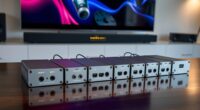
To achieve proper color calibration for game environments, you need to adjust your display and lighting to match your artistic vision and storytelling goals. Start with baseline calibration, then tweak color grading to set the right mood, whether vibrant or muted. Use ambient lighting to highlight key areas and create depth. Small adjustments can make a big difference in consistency and realism. Keep refining these settings to craft immersive and polished environments—more tips lie ahead if you keep exploring.
Key Takeaways
- Establish a baseline calibration for displays and lighting setups to ensure color consistency across game environments.
- Use color grading techniques to adjust the overall mood and atmosphere, aligning with the game’s artistic vision.
- Calibrate ambient lighting to enhance scene realism, depth, and focus, influencing how colors are perceived.
- Continuously refine calibration throughout development to maintain visual coherence and support narrative storytelling.
- Proper calibration enhances immersion, emotional impact, and creates a polished, professional visual experience for players.

Color calibration plays an essential role in creating immersive and visually consistent game environments. When you focus on proper calibration, you’re ensuring that every shade, hue, and tone aligns perfectly with your intended artistic vision. One of the key elements in this process is color grading, which allows you to adjust the overall color palette of your game to evoke specific moods or atmospheres. Whether you’re aiming for a vibrant, energetic scene or a muted, somber tone, color grading helps you fine-tune the visual storytelling so players feel fully immersed. Alongside this, ambient lighting becomes critical in establishing the scene’s depth and realism. By carefully calibrating ambient lighting, you can control how light interacts with objects and characters, influencing the perception of space and mood. Incorporating natural materials such as wood and stone into your environment can also enhance authenticity and immersion.
When you get these elements right, your game environment feels cohesive and believable. For example, if your scene is set during dusk, proper color grading can enhance warm oranges and cool blues, creating a striking contrast that draws players into the moment. At the same time, ambient lighting ensures that shadows and highlights are consistent with the time of day, making everything look more natural. You might use softer, diffuse ambient light to generate a calm atmosphere or sharper contrasts to suggest tension or danger. The key is to calibrate these lighting levels to match the color palette, so the environment complements the narrative and gameplay. This synergy between color grading and ambient lighting guarantees players aren’t distracted by visual inconsistencies, keeping their focus on the story and interaction.
In practical terms, you’ll want to start by establishing a baseline calibration for your display or development environment. Once you’re confident in your color accuracy, you can experiment with color grading to set the mood. Adjust ambient lighting to highlight key areas or guide the player’s eye towards important objects without overpowering the scene. When you do this deliberately, your game feels more polished and professional, enhancing user experience. Remember, even subtle shifts in ambient lighting can dramatically change how colors appear, so calibration should be a continuous process throughout development. By paying attention to these details and maintaining consistency, you help create game environments that are visually compelling, emotionally resonant, and truly immersive. Mastering color grading and ambient lighting calibration empowers you to craft environments that captivate players from start to finish.

SOULWIT 50Pcs Self Adhesive Cable Management Clips - Black
- 🔷SUPER EASY TO USE: Stick to clean surface, open...
- 🔷PREMIUM MATERIAL: Made from eco-friendly Polyamide66 material,...
- 🔷STICKY IN MANY SURFACES: Works on all clean surfaces...
As an affiliate, we earn on qualifying purchases.
Frequently Asked Questions
How Often Should Color Calibration Be Performed?
You should perform monitor calibration regularly, ideally once a month, to maintain ideal color consistency. Frequent calibration ensures your display accurately reflects colors, which is especially important for game environments where color precision matters. If you notice colors appearing off or changes in display quality, it’s a sign to recalibrate immediately. Consistent calibration helps you achieve reliable visuals and a better gaming experience.
Can Calibration Improve Gameplay Performance?
Think of calibration as sharpening your vision’s lens—yes, it can improve gameplay performance. By ensuring color consistency and enhancing visual immersion, you’re better equipped to spot details, react faster, and stay engaged longer. When your display accurately reflects game environments, your focus sharpens, and decisions become instinctive. Ultimately, calibration isn’t just about colors; it’s about aligning your perception with reality, giving you an edge in every virtual challenge.
What Tools Are Best for Color Calibration?
You should use tools like a colorimeter or spectrophotometer for the best color calibration. These devices help you achieve accurate color accuracy and optimize display settings, ensuring your game environment looks vibrant and consistent. Popular options include the X-Rite i1Display Pro or Datacolor SpyderX. Regular calibration with these tools keeps your display settings precise, giving you the visual fidelity needed for immersive gameplay and better in-game decision-making.
Does Calibration Affect Different Display Types Equally?
Does calibration affect different display types equally? Not quite. Your display technology plays a big role in calibration consistency. For example, LCDs, OLEDs, and projectors each respond differently to calibration adjustments. So, while calibration improves color accuracy across all types, some displays require more precise tuning. You need to understand your specific display’s characteristics to achieve best results, ensuring consistent, true-to-life colors in your game environments.
Are There Online Calibration Services Available?
Yes, online calibration services are available, and they’re becoming more popular. You can find several reputable providers offering remote calibration tools to optimize your display’s color accuracy. Service availability varies depending on your location and the provider, but many platforms now support worldwide access. Simply choose a trusted online calibration service, follow their instructions, and improve your display’s color performance without needing in-person assistance.

XHF 120 PCS Adhesive Cable Wire Clips Black, Outdoor Christmas Light Clips, Cable Management Wire Organizer Cord Holder for Under Desk, Car, Wall, TV PC Ethernet Cable
- High quality material:XHF Adhesive Cable Clips are manufactured...
- Widely used: USB Cable, Ethernet Cable, Outdoor...
- Size: Base 5/8" x 5/8", inner...
As an affiliate, we earn on qualifying purchases.
Conclusion
By calibrating colors accurately, you enhance your gaming experience, making worlds feel more immersive and true to life. Proper calibration guarantees that every hue and shade serves its purpose, heightening realism and visual appeal. Don’t you want to fully immerse yourself in the game’s environment? Taking the time to calibrate your display isn’t just technical—it’s essential for truly appreciating the artistry behind your favorite games. After all, isn’t the vividness worth the effort?

120PCS XHF Adhesive Cable Wire Clips White, Cable Staples Outdoor Cable Management Wire Organizer Cord Holder for Under Desk, Car, Wall, TV PC Ethernet Cable
- High quality material:XHF Adhesive Cable Clips are manufactured...
- Widely used: USB Cable, Ethernet Cable, Outdoor...
- Size: Base 5/8" x 5/8", inner...
As an affiliate, we earn on qualifying purchases.

Optoma ML1080UST 1080p Photon Go Ultra Short Throw Full HD LED Triple Laser DLP Google TV Smart Projector
- 10 in. Ultra Short Throw Distance
- Integrated Dolby Audio
- Triple Laser RGB Technology
As an affiliate, we earn on qualifying purchases.