TL;DR
Open a free Amazon Business account
Business pricing, bulk buying and tax-exempt orders.
Create a free accountAs an affiliate, we earn on qualifying purchases.
Prebuilt AI workstations are now often as cost-effective as DIY builds thanks to component shortages and bulk buying. They offer faster setup, validated thermals, and support, but building gives you more control and upgrade options. Your choice hinges on your priorities for time, budget, and customization.
Imagine unboxing a ready-made AI powerhouse, plugged in, and ready to tackle complex models — no fuss, no delays. Or picture spending weeks sourcing parts, assembling, troubleshooting, and tuning your own machine, all for a few dollars saved. The choice isn’t as clear-cut as it used to be, especially with AI workloads demanding high-end GPUs, massive RAM, and reliable cooling.
In 2026, the equation shifts. Prebuilt AI workstations often match or beat DIY costs thanks to supply chain issues and bulk discounts. But beyond price, the decision boils down to how much control, speed, and support matter to you. This guide breaks down the real tradeoffs, so you can pick what suits your workflow best.
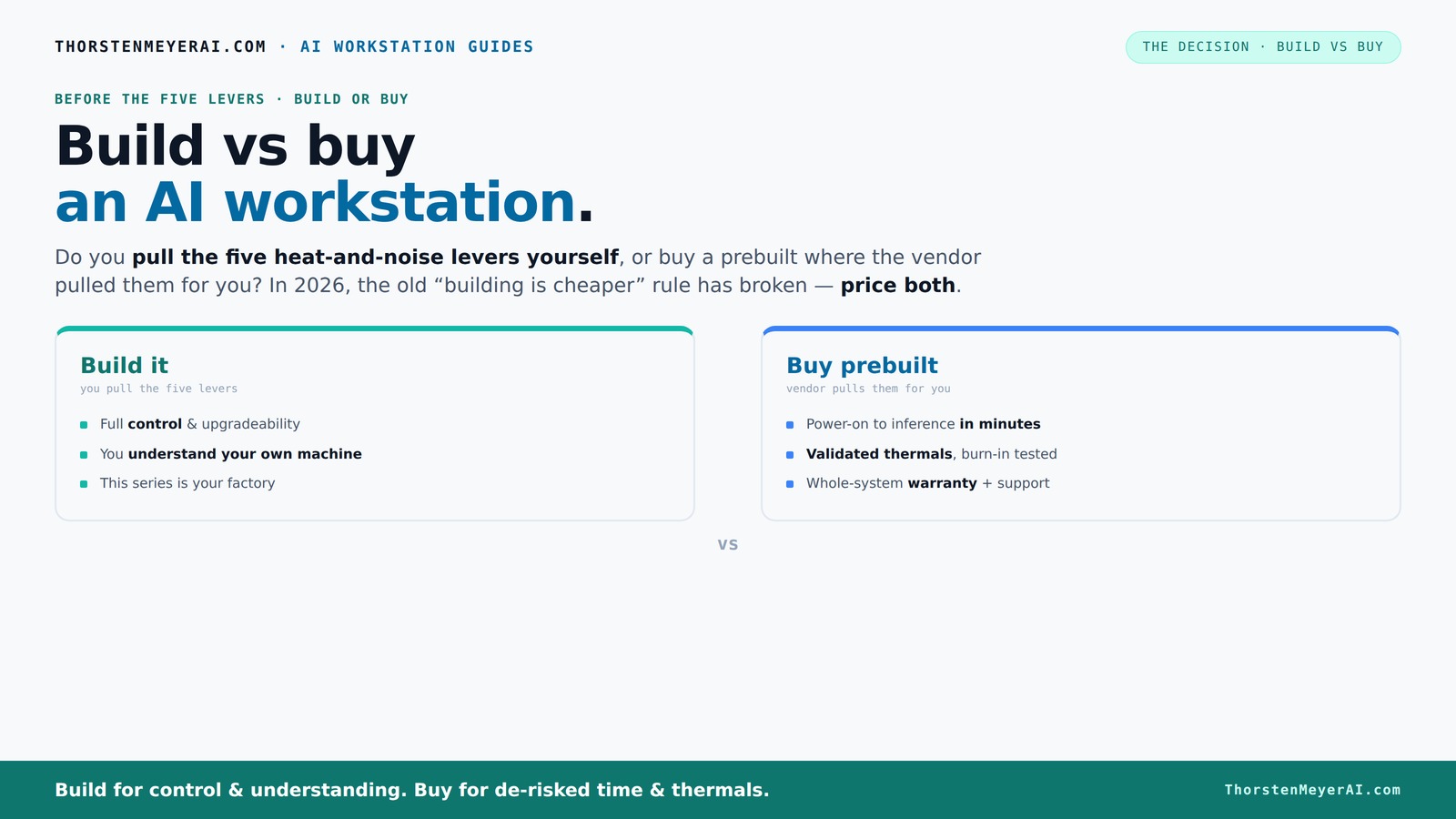
Build vs buy
an AI workstation.
The real question behind this whole series: do you pull the five heat-and-noise levers yourself, or buy a prebuilt where the vendor pulled them for you? And in 2026, the old “building is cheaper” rule has broken. Match your situation in Part 3.
Key Takeaways
- Market shortages and bulk buying have made prebuilt AI workstations often as affordable as DIY builds, especially at high-end specs.
- Prebuilts save time, come with validated thermals, and include support, making them ideal for quick deployment and risk reduction.
- Building your own machine offers superior control, upgradeability, and customization, but requires time, expertise, and ongoing maintenance.
- Always compare total costs for your specific configuration — market conditions have shifted the traditional build-cheaper rule.
- Evaluate your priorities: speed, support, control, or future-proofing — to choose the system that fits your workflow best.
What an AI workstation actually is — and why it matters
An AI workstation is a high-powered computer designed to handle machine learning, deep learning, and data processing tasks. Think of it as a race car — built with premium parts, tuned for performance, and optimized for long hours of heavy lifting. It typically includes a beefy GPU (or several), lots of RAM, fast storage, and cooling tailored for sustained loads.
For example, a typical AI rig might have an NVIDIA RTX 4090 or A100 GPU, 128GB of DDR5 RAM, and a NVMe SSD array to feed data fast. These machines aren’t just about raw power; they’re optimized for stability, noise reduction, and thermal efficiency, making them critical for research labs, startups, and AI creators alike.
Build vs buy: the real tradeoff — speed, support, and control
The core question: do you want a machine you assemble yourself, or one that's ready to go out of the box? Building a system means pulling the levers — choosing each part, tuning cooling, optimizing airflow, and solving compatibility issues. If you're considering your options, you might want to build vs buy a prebuilt AI workstation. It’s about control and customization.
Buying prebuilt shifts that burden to the vendor — they handle thermal tuning, validation, and warranty support. You get a plug-and-play solution with tested thermals and often, better noise management. For example, a vendor like Lambda offers systems with 30% lower noise levels, tested under full load, and backed by support. It’s a clear win if you value predictability and quick deployment.
On the flip side, building allows you to pick every component, upgrade easily, and tailor to your specific workload. But it requires time, expertise, and patience. The tradeoff isn’t just cost — it’s control, speed, and peace of mind.
Cost comparison: why the old rule no longer applies
Most people assume building a PC saves money — but in 2026, that’s not always true. For insights on this, see build vs buy a prebuilt AI workstation. Component shortages and inflation have driven up prices for GPUs, RAM, and SSDs. A build that used to cost under $1,000 now easily surpasses $1,250 before OS and extras.
Meanwhile, prebuilt manufacturers bought components in bulk before prices spiked. As a result, many can offer systems at prices comparable to or even lower than DIY. For instance, a high-end AI workstation with dual GPUs might cost you around $3,500 from a vendor, versus assembling one yourself at approximately the same price, factoring in time and potential trial-and-error with thermals.
So, the old ‘build cheaper’ rule doesn’t hold anymore — you need to compare the total cost of both options for your specific setup.
Performance and reliability: does prebuilt deliver?
Performance isn’t just about specs — it’s about how well the system runs under load. Prebuilt systems often undergo extensive testing to ensure reliability. Prebuilt systems like those from Puget or BIZON undergo extensive burn-in testing, ensuring they won’t throttle or overheat during long training runs. You’re paying for tested stability and support.
DIY builds can match or surpass this, but only if you know what you’re doing. Poor airflow, mismatched cooling, or subpar parts can lead to thermal throttling, noise, or hardware failures. For example, a DIY enthusiast might undervolt a GPU to reduce noise, but if they don’t tune airflow properly, the system can overheat and throttle, wasting hours of training time.
In short, prebuilt offers peace of mind for performance consistency, while DIY demands expertise and ongoing maintenance.
Component quality checklist — what’s really inside?
Not all parts are created equal, especially in prebuilt systems. For a detailed checklist, see component quality checklist. Some vendors cut corners on the motherboard or power supply to save costs. But for AI workloads, high-quality cooling, stable power delivery, and fast memory matter.
Here’s what to look for:
- High-end GPU (RTX 4090, A100, or similar)
- Premium motherboard with robust VRMs
- Power supply rated at least 80 Plus Gold, with enough wattage
- Quiet, efficient cooling — liquid cooling or high-quality air coolers
- Fast, reliable storage, preferably NVMe SSDs
For example, a prebuilt that advertises “quiet operation” should use a high-quality cooler and well-designed airflow. Otherwise, noise and thermal issues crop up, impacting long-term stability.
Upgrade paths: future-proof or locked in?
Building your own machine makes upgrades straightforward — swap out RAM, add more storage, or upgrade GPUs as needed. If you're planning long-term upgrades, consider building vs buying. You control the motherboard and power supply, so future-proofing is easier.
Prebuilts vary. Some use proprietary parts or tight configurations that limit upgrades. Others, especially high-end workstations, are designed with future expansion in mind. For example, a top-tier prebuilt might offer extra PCIe slots or RAM slots for future upgrades but check the specs carefully.
In practice, if you plan to evolve your AI setup over several years, DIY offers more flexibility. But some prebuilt vendors are catching up, offering modular designs that simplify upgrades.
Warranty, support, and service — what’s really covered?
Prebuilt systems come with a warranty — often 3-5 years — covering parts and labor. If something breaks during a training run, support is just a call away. Many vendors offer onsite or rapid replacement options.
DIY builds mean you’re on your own or have to buy separate warranties for individual parts. Troubleshooting can take hours, and resolving hardware issues may require technical expertise.
For example, if your GPU fails mid-training, a prebuilt’s support team can handle RMA and repairs swiftly. DIY users might spend days diagnosing and replacing parts, risking lost productivity.
Best use cases for prebuilt systems
Prebuilt AI workstations shine when time-to-deploy and reliability matter most. If you’re a startup or researcher needing to start training models tomorrow, a prebuilt minimizes delays. They’re ideal for teams with limited technical support or for those who want a plug-and-play setup.
For example, a data scientist at a university can buy a preconfigured system, run experiments immediately, and rely on vendor support if issues arise.
When building makes more sense — control, cost, and customization
If you’re an AI hobbyist, small startup, or researcher with specific hardware needs, building your own system often provides better control and upgradeability. It’s also more cost-effective if you already have the technical skills or want to learn.
For example, someone focused on proprietary data might want a custom cooling loop or specific hardware integrations — something a prebuilt can’t easily offer.
Decision framework: which option fits your needs?
Answer these key questions:
- Do you need a system immediately? If yes, prebuilt wins.
- Are you comfortable troubleshooting and customizing? If yes, build.
- Is support and warranty a priority? Prebuilt offers peace of mind.
- Do you want to upgrade or modify over time? Build provides better future-proofing.
- Is budget a concern, considering current market conditions? Price both options for your specs.
Frequently Asked Questions
Is it cheaper to build or buy a prebuilt AI workstation?
In 2026, the cost difference has narrowed significantly due to component shortages and bulk discounts. Often, prebuilts match or beat DIY prices at high-end specs, especially when factoring in time and troubleshooting costs.Do prebuilts use lower-quality parts?
Not necessarily. Reputable vendors use high-quality components, but it's important to check specifications. Some cheaper prebuilts may cut corners on cooling or power supplies, so always review the part list.Will a prebuilt AI workstation perform worse than a custom build?
Usually not. Prebuilts undergo extensive testing, ensuring thermal stability and performance under load. DIY systems can match this performance if you know what you’re doing, but they require ongoing tuning.Are prebuilts easier to troubleshoot if something breaks?
Yes. Prebuilts come with support and warranty coverage, so hardware failures are handled quickly. DIY builds mean diagnosing issues yourself, which can take hours or days.Can I upgrade a prebuilt AI workstation later?
It depends. Some prebuilts are designed with future upgrades in mind, but proprietary parts or limited expansion slots can restrict modifications. Check the vendor’s upgrade policy before purchasing.Conclusion
Choosing between build and buy for your AI workstation isn’t just about price — it’s about what you value most: speed, support, or control. With market shifts, prebuilt systems often match DIY costs and deliver reliability you can count on, making them a smart choice for many.
But if you crave mastery over every part and plan to upgrade for years to come, building your own rig still offers unmatched flexibility. The key is to match your decision to your workflow, budget, and long-term goals.
Remember, in the AI world, your machine is your partner — treat it wisely.NFL season / tailgating Picks
team gear
As an affiliate, we earn on qualifying purchases.