
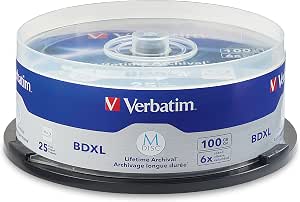
For most people comparing the best M-DISC Blu-ray discs, I’d start with Verbatim’s 100GB BDXL 6x 25-pack spindle: it combines high capacity with a larger supply for ongoing archives. The 50GB inkjet-printable 10-pack is a more manageable choice for labeled projects, while the 25GB 5-pack suits smaller jobs or a first compatibility check. The main tradeoffs are capacity versus drive compatibility, bulk packaging versus individual cases, and printable surfaces versus standard branded labels. A higher-capacity disc can reduce the number of discs you handle, but only if your burner supports BDXL. Read on for the full comparison and advice on matching a format and pack size to your archive.

Get business pricing on your home office setup
- Business-only prices and quantity discounts
- Tax-exempt purchasing
- Multiple users, one account, clear invoices
Complete the kit


Key Takeaways
- Capacity is the biggest dividing line: the lineup spans 25GB BD-R, 50GB dual-layer, and 100GB BDXL discs, so the right pick depends on both archive size and burner support.
- The 100GB 6x 25-pack spindle is the strongest general-purpose bulk option for buyers who can use BDXL and want fewer discs to manage.
- Printable surfaces serve different workflows: inkjet-printable 50GB discs suit labeled mid-size projects, while thermal-hub and white printable 100GB options target specific labeling setups.
- Packaging affects handling, not disc capacity: jewel-case packs favor individual protection and distribution; spindles suit users who will provide their own sleeves or storage.
- A small pack is useful for compatibility checks: the 25GB 5-pack or single 100GB branded disc can help test a burner and software before committing to a larger quantity.



| M-DISC Blu-ray disc | Recording speed | Warranty | Format | Brand |
|---|---|---|---|---|
| Verbatim M-DISC BD-R Blu-ray D | 1–6x | — | — | Verbatim |
| Verbatim M-DISC BDXL 100GB 6x | Up to 6x | 10-year limited warranty | Blu-ray BDXL | Verbatim |
| Verbatim M DISC BDXL 100GB 6x | 6x | 10-year limited warranty | BD-R XL | Verbatim |
| Verbatim M DISC BDXL 100GB 6x | Up to 6x | 10-year limited warranty | Blu-ray BDXL BD-R | Verbatim |
| Verbatim M DISC BDXL 100GB 4X | 4x | 10-year limited warranty | Blu-ray BD-R BDXL | Verbatim |
| Verbatim M DISC BD-R DL 50GB 6 | Up to 6X | 10-year limited warranty | Dual-layer Blu-ray BD-R | — |
| Verbatim M DISC 100GB 4x BDXL | — | 10 years | — | — |
| Verbatim M DISC BD-R 25GB 4x A | 4X | 10-year limited warranty | Blu-ray BD-R, single-layer | — |
More Details on Our Top Picks
Verbatim M-DISC BD-R Blu-ray Discs, 25GB, 1–6x, Printable White Label, 5-Pack
This five-disc set suits buyers who want individual 25GB archival discs they can label with a compatible inkjet printer. Its titanium-layer design is intended to protect recorded data from light, heat, and humidity, while the printable white face makes organizing personal files or project backups easier. Compared with Verbatim’s 100GB BDXL options in this roundup, each disc holds far less, but these standard-capacity BD-Rs may fit workflows that do not need a BDXL burner. The tradeoff is the single-recording format: a mistaken burn cannot be corrected by reusing the disc, and recording still requires an M-DISC-compatible drive. I’d choose this pack for smaller, clearly labeled archives rather than large data collections.
Pros:- Titanium-layer design is intended to resist light, heat, and humidity.
- Printable white surface works with compatible inkjet printers.
- 25GB capacity can suit smaller, separated backup sets.
- Supports recording speeds from 1x to 6x.
Cons:- Requires an M-DISC-compatible drive for recording.
- Single-recording discs cannot be reused if a burn needs correction.
- Lower capacity per disc than the 100GB BDXL products in this roundup.
Best for: Home archivists who want to print clear labels on a small set of 25GB backups and already have an M-DISC-compatible burner.
Not ideal for: Photographers or organizations archiving large collections, since 25GB per disc means more discs and handling than the 100GB BDXL alternatives.
- Brand:Verbatim
- Model:DBR25RMDP5V2
- Disc type:M-DISC BD-R
- Capacity:25GB per disc
- Recording speed:1–6x
- Quantity:5 discs
- Recording type:Single recording
- Label surface:Printable white surface
- Compatibility:M-DISC drives; compatible inkjet printers
Our verdict“Choose this pack for printable, smaller archival sets; pick a 100GB BDXL option if reducing disc count matters more.”
Verbatim M-DISC BDXL 100GB 6x Archival Blu-ray Discs, 25-Pack Spindle
For buyers building a large archive, this spindle pairs 100GB per disc with a 25-disc supply, making it the highest-volume choice in this group. The inorganic recording layer is designed to resist light, temperature, and humidity, and the discs support recording speeds up to 6x. Compared with the five-disc Verbatim M-DISC BDXL pack with jewel cases, this spindle provides more media in one package but less individual protection for storage and sorting. It also requires a compatible BDXL drive; a standard Blu-ray burner is not enough. The 10-year limited warranty adds a clear support term, but these are still write-once archival media, not a flexible substitute for reusable backup drives.
Pros:- 100GB capacity per disc reduces the number of discs needed for large archives.
- 25-disc spindle supplies media for repeated archival projects.
- Inorganic recording layer is designed to resist light, temperature, and humidity.
- Includes a 10-year limited warranty.
Cons:- Requires a compatible BDXL optical drive.
- Spindle packaging does not provide an individual jewel case for each disc.
- Write-once media cannot be reused for updated or corrected recordings.
Best for: Photographers, video editors, and small offices with a BDXL burner who need to create multiple 100GB archival copies.
Not ideal for: People without a BDXL-compatible drive or buyers who need individually cased discs for frequent handling and organized shelving.
- Brand:Verbatim
- Format:Blu-ray BDXL
- Storage capacity:100GB per disc
- Recording speed:Up to 6x
- Pack size:25 discs
- Recording layer:Inorganic
- Compatibility:Compatible BDXL drives
- Warranty:10-year limited warranty
Our verdict“Choose this spindle for high-volume 100GB archiving when you have a BDXL burner and can provide your own disc storage.”
Verbatim M DISC BDXL 100GB 6x BD-R Disc, Branded Surface, 1-Pack
This one-disc 100GB BDXL option is a practical way to make a single large archive without committing to a multi-disc pack. Its inorganic write layer is designed for long-term storage and resistance to light, temperature, and humidity, while the 10-year limited warranty provides a defined support period. Compared with the 25-pack spindle, it avoids buying a larger supply before you know whether your burner and archival workflow suit BDXL media. The tradeoff is poor fit for ongoing archiving: the single-disc quantity offers no reserve for failed burns or future projects, and the disc is non-rewritable. Like the other 100GB choices here, it needs a compatible BDXL drive, so check hardware before buying.
Pros:- 100GB capacity accommodates a large archive on one disc.
- Inorganic write layer is designed for long-term storage.
- Rated for resistance to light, temperature, and humidity.
- Includes a 10-year limited warranty.
Cons:- Only one disc is included, leaving no spare for a failed burn.
- Non-rewritable format does not allow updates to recorded data.
- Requires a compatible BDXL optical drive.
Best for: A BDXL-drive owner who needs one large archival disc for a specific project or wants to check media compatibility before buying a pack.
Not ideal for: Anyone building a recurring archive or needing spare discs, since this listing contains only one non-rewritable disc.
- Brand:Verbatim
- Format:BD-R XL
- Storage capacity:100GB
- Recording speed:6x
- Rewritable:No
- Pack quantity:1 disc
- Compatibility:BDXL optical drives
- Warranty:10-year limited warranty
- Model number:98912
Our verdict“Pick this single disc for one large archival job or a compatibility check, not for stocking an ongoing backup workflow.”
Verbatim M DISC BDXL 100GB 6x Archival Blu-ray Discs, 5-Pack with Jewel Cases
This five-disc set balances 100GB archival capacity with a useful storage detail: every disc comes with a jewel case. That makes it easier to separate projects, label each archive, and protect discs when they are handled or shelved. The inorganic write layer is designed to resist light, temperature, and humidity, and the discs support speeds up to 6x. Compared with the 25-disc spindle, this pack gives up bulk quantity in exchange for individual cases; compared with the one-disc option, it provides room for several archives without requiring a larger stock. The main limitation remains hardware: recording needs a compatible BDXL burner, and the non-rewritable format is not suited to data that changes often.
Pros:- 100GB capacity per disc suits large project archives.
- Five discs provide a useful small collection without the bulk of a 25-pack.
- Individual jewel cases support safer handling and organized storage.
- Inorganic recording layer is designed for archival resistance to environmental exposure.
Cons:- Requires a compatible BDXL burner and optical drive.
- Non-rewritable discs cannot accommodate routine data updates.
- Fewer discs than the 25-pack spindle for buyers creating a large archive.
Best for: Home archivists and small studios who want several large backups stored separately in protective jewel cases.
Not ideal for: High-volume archival programs that need many discs at once, or buyers whose existing burner does not support BDXL.
- Brand:Verbatim
- Format:Blu-ray BDXL BD-R
- Capacity:100GB per disc
- Recording speed:Up to 6x
- Quantity:5 discs
- Cases:Individual jewel cases
- Compatibility:Compatible BDXL burners and optical drives
- Warranty:10-year limited warranty
Our verdict“Choose this pack when individual cases and a manageable supply matter more than the bulk quantity of a spindle.”
Verbatim M DISC BDXL 100GB 4X White Thermal Hub Printable – 25pk Spindle
This 25-disc spindle is the standout for buyers who need custom thermal-printed labels across a large 100GB archive. Its white, hub-printable surface supports full-surface thermal printing, while the inorganic layer is designed for long-term stability and the product is described as tested to meet U.S. Department of Defense durability standards. Compared with the 6x Verbatim 100GB spindle, this version trades faster recording for printable media and tops out at 4x. It also shares the 25-disc bulk format, so it suits batch archiving better than small, occasional jobs. The discs are non-rewritable and require a BDXL-compatible drive; buyers without thermal printing equipment will not benefit from the defining feature.
Pros:- 100GB capacity per disc supports large archival files.
- White, hub-printable surface supports full-surface thermal printing.
- Inorganic recording layer is designed for long-term stability.
- Includes a 10-year limited warranty.
Cons:- Recording speed is limited to 4x, below the 6x alternatives in this roundup.
- Non-rewritable discs cannot be updated after recording.
- Requires a BDXL-compatible drive and suitable thermal-printing equipment to use its main labeling feature.
Best for: Organizations and archivists with a BDXL burner and compatible thermal printer who need consistently labeled 100GB discs in bulk.
Not ideal for: Buyers who do not own compatible thermal-printing equipment or who prioritize faster recording over printable surfaces.
- Brand:Verbatim
- Model number:98916
- Storage capacity:100GB per disc
- Format:Blu-ray BD-R BDXL
- Recording speed:4x
- Recording capacity:12 hours
- Quantity:25 discs
- Label surface:White, full-surface thermal hub printable
- Warranty:10-year limited warranty
Our verdict“Choose this spindle for bulk 100GB archives that need thermal-printed labels, but favor the 6x spindle if printing is not part of your workflow.”
Verbatim M DISC BD-R DL 50GB 6X Inkjet Printable Archival Discs, 10-Pack
These dual-layer 50GB discs offer a useful middle ground between standard 25GB BD-R media and the 100GB BDXL options in this roundup. Compared with the Verbatim M DISC BDXL 100GB 4x BDXL BD-R Printable Discs, 25-Pack, each disc holds less data, but this pack supports up to 6X recording and does not require a BDXL drive. Its inorganic recording layer is designed to resist light, temperature, and humidity, making it a fit for files meant to be stored rather than rewritten. The inkjet-printable surface also helps identify discs in a labeled archive. The tradeoffs are a 10-disc pack and non-rewritable media, so it suits a modest archive better than frequent backups or large projects. The stated longevity is not a guarantee, and a compatible Blu-ray recorder is required.
Pros:- 50GB capacity per disc reduces disc changes compared with 25GB BD-R media
- Up to 6X recording speed
- Inorganic recording layer designed for long-term archival storage
- Inkjet-printable surface supports labeled disc collections
Cons:- Requires a compatible dual-layer Blu-ray recorder
- Pack contains only 10 discs
- Longevity claims are based on testing and are not a guarantee
Best for: Home archivists who want more capacity per disc than 25GB media without moving to a BDXL drive
Not ideal for: Users building a large archive or needing reusable media; the 10-disc pack is limited, and BD-R discs cannot be rewritten
- Format:Dual-layer Blu-ray BD-R
- Capacity:50GB per disc
- Recording speed:Up to 6X
- Pack size:10 discs
- Surface:Inkjet printable
- Recording capacity:50 minutes
- Warranty:10-year limited warranty
Our verdict“Choose this 50GB pack if you want a step up from 25GB discs without the BDXL drive requirement.”
Verbatim M DISC 100GB 4x BDXL BD-R Printable Discs, 25-Pack
When minimizing the number of discs matters most, this pack leads the group with 100GB per disc and 25 discs in the spindle. Compared with the 50GB Verbatim M DISC BD-R DL 50GB 6X Inkjet Printable Archival Discs, 10-Pack, it can hold twice as much on each disc and offers a larger pack, though its 4X write speed is lower. The BDXL format makes it better suited to consolidating large projects, such as video libraries or extensive photo archives, than to buyers with an ordinary Blu-ray drive. Its white, hub-printable surface supports detailed labeling, while the inorganic write layer is designed for archival storage. The main compromises are dependence on a compatible BDXL drive and non-rewritable media: plan the contents before burning, since mistakes cannot be corrected by erasing and reusing a disc.
Pros:- 100GB capacity per disc helps consolidate large archives
- 25-disc pack supports a sizable storage project
- White inkjet surface is printable across the disc, including the hub
- Inorganic write layer is designed for long-term data archival
Cons:- Requires a compatible BDXL optical drive
- 4X write speed is lower than the 6X 50GB option in this roundup
- Non-rewritable discs make errors or changing files harder to manage
Best for: Photographers, videographers, and data archivists with a BDXL drive who want to store large collections on fewer discs
Not ideal for: Buyers with standard Blu-ray drives or anyone who needs rewritable backup media
- Disc type:M DISC BDXL BD-R
- Capacity:100GB per disc
- Write speed:4X
- Quantity:25 discs
- Surface:White inkjet and hub printable
- Compatibility:BDXL optical drives
- Warranty:10 years
Our verdict“Pick this pack for high-volume archiving if you have a BDXL drive and value fewer discs over faster writing.”
Verbatim M DISC BD-R 25GB 4x Archival Blu-ray Discs, 25-Pack
This is the straightforward pick for buyers who want 25GB M-DISC media in a larger 25-disc pack and do not need dual-layer or BDXL capacity. Unlike the 100GB Verbatim M DISC 100GB 4x BDXL BD-R Printable Discs, 25-Pack, these single-layer discs work with a compatible BD-R drive rather than requiring BDXL support. That broader format fit makes them a practical choice for distributing backups across more discs, but it also means more disc handling and labeling for the same amount of data. Their inorganic write layer is designed for archival storage and resistance to light, temperature, and humidity. They record at up to 4X and cannot be rewritten, so this pack is best for planned, finished backups—not temporary files or a workflow that changes often.
Pros:- Compatible with BD-R drives without requiring BDXL support
- 25 discs provide a larger pack than the 10-disc 50GB option
- Inorganic write layer is designed for long-term archival storage
- Designed to resist light, temperature, and humidity
Cons:- 25GB capacity means more discs are needed than with 50GB or 100GB media
- Non-rewritable format does not suit changing backup sets
- Requires a compatible BD-R drive
Best for: Users with a standard BD-R drive who want to create a collection of permanent, smaller-capacity backups
Not ideal for: People archiving large video or photo libraries who want fewer discs, or users who need to rewrite backups
- Format:Blu-ray BD-R, single-layer
- Capacity:25GB per disc
- Recording speed:4X
- Pack size:25 discs
- Rewritable:No
- Warranty:10-year limited warranty
- Item weight:451g
Our verdict“Choose these discs for a standard BD-R drive and a planned archive where wider drive compatibility matters more than capacity per disc.”
How We Picked
I compared these eight Verbatim M-DISC options by the factors that change the buying decision: disc capacity and format, pack size, recording speed, surface type, and packaging. I also treated burner compatibility as a practical constraint: 100GB BDXL discs can hold more per disc than 25GB BD-R or 50GB dual-layer media, but they require compatible hardware and software.
The ranking favors options with a clear fit for common archival needs, not simply the largest capacity or pack. The 100GB 6x spindle leads for bulk storage when BDXL support is confirmed; smaller packs and case-packed discs rank well for testing, careful handling, or distributing individual archives. Printable and thermal-printable choices earn a place for readers who need direct labeling, while their more specialized surfaces make them less universal than standard branded media.
| M-DISC Blu-ray disc | Compatibility | Format |
|---|---|---|
| Verbatim M-DISC BD-R Blu-ray D | M-DISC drives; compatible inkjet printers | — |
| Verbatim M-DISC BDXL 100GB 6x | Compatible BDXL drives | Blu-ray BDXL |
| Verbatim M DISC BDXL 100GB 6x | BDXL optical drives | BD-R XL |
| Verbatim M DISC BDXL 100GB 6x | Compatible BDXL burners and optical drives | Blu-ray BDXL BD-R |
| Verbatim M DISC BDXL 100GB 4X | — | Blu-ray BD-R BDXL |
| Verbatim M DISC BD-R DL 50GB 6 | — | Dual-layer Blu-ray BD-R |
| Verbatim M DISC 100GB 4x BDXL | BDXL optical drives | — |
| Verbatim M DISC BD-R 25GB 4x A | — | Blu-ray BD-R, single-layer |
Factors to Consider When Choosing Best M-DISC Blu-ray Discs
Before choosing a pack, match the media to the archive workflow you can maintain. Capacity, drive support, labeling, and storage format all affect whether a disc is useful years from now—not just how much data fits on it today.
Match Disc Capacity to Your Burner
Start by checking the exact specifications of your Blu-ray burner and authoring software, especially support for BDXL and 100GB media. A drive that records ordinary Blu-ray discs may not support BDXL, and a disc that cannot be written is no archive solution. Check the drive maker’s compatibility list rather than relying on the label “Blu-ray.” If you are unsure, a small pack or single disc can limit the cost of discovering a mismatch. Also check that your playback or verification device can read the format if you expect to retrieve files on another computer. Buyers with older hardware may be better served by 25GB or 50GB media that their equipment explicitly supports.
Choose Capacity Around Retrieval and Recovery
Higher capacity reduces the number of discs in a large archive, but it also concentrates more files on each disc. With 100GB media, one disc can hold a substantial project; splitting irreplaceable data across multiple discs or maintaining a second copy can make recovery less dependent on a single item. Smaller 25GB discs can make sense for separate clients, projects, or yearly batches, even when they require more shelf space. Think about how you will find and restore a file, not only how much data you can write at once. A simple index stored in more than one location can save time when an archive grows. Pick the capacity that fits both the archive and your retrieval habits.
Treat Recording Speed as a Compatibility Detail
The listed 4x or 6x speed is a maximum media specification, not a promise that every write will finish at that rate. Actual recording speed depends on the burner, firmware, software, and the media’s supported write strategy. For archival work, a successful write and a later verification pass matter more than chasing the highest listed speed. Check whether your burner recognizes the particular disc type and supports its recording profile. Avoid assuming that all BDXL discs behave the same simply because their capacities match. If your workflow is occasional and carefully checked, the difference between a 4x and 6x label may matter less than compatibility and handling.
Pick a Surface That Fits Your Labeling Setup
Printable discs are useful when a clear, durable index needs to travel with the media, but “printable” is not one universal method. Inkjet printing and thermal printing require different equipment, and a thermal-hub printable surface has a particular printer workflow in mind. Confirm the printable area and your printer’s supported disc type before buying a bulk pack. Handwritten labels may be simpler for a small home archive, while a branded surface avoids the need for disc printing. Use a labeling method intended for optical discs and keep information legible without obscuring the read area. Choosing a surface you can label consistently is more useful than buying a specialty finish your setup cannot use.
Balance Spindle Convenience With Individual Protection
A spindle stores many discs compactly, which is practical for a large archive, but it does not give every disc its own protective case. Plan for suitable sleeves or cases and a stable place to keep them before choosing a bulk pack. Jewel-case packs take more room but make individual handling and sharing easier. This difference can affect day-to-day organization, particularly if discs will move between people or locations. Avoid stacking loose discs or placing writable surfaces against one another. The best package is the one your storage system can protect and keep organized over time.
Plan the Archive Beyond the Disc Itself
M-DISC media is one part of an archival plan, not a replacement for maintaining more than one copy of important files. Keep a separate copy in another location or on another storage medium, and periodically check that files remain readable. Store discs in a cool, dry place away from direct sunlight, dust, and rough handling. Record the disc contents, write date, and any software or file-format details in an index kept separately. Retain the hardware or a practical route to compatible hardware for future reading, especially if your archive uses BDXL. These habits address risks that a disc’s capacity and surface cannot solve on their own.
Frequently Asked Questions
Will a Blu-ray burner that writes 50GB discs also write 100GB BDXL discs?
Not necessarily. BDXL support is a separate compatibility requirement, so a burner that handles dual-layer 50GB discs may still lack support for 100GB media. Check the exact drive model’s specifications and firmware details, then confirm that your burning software recognizes BDXL. If you are buying a large spindle, testing one disc first can help avoid a pack you cannot use. Also check that you have a way to read the discs when you need to retrieve the files.
Should I choose 100GB BDXL or 50GB dual-layer discs for a home archive?
Choose 100GB BDXL when your drive supports it and reducing the number of discs is a priority. The 50GB format can be a better fit if your hardware supports dual-layer recording but not BDXL, or if you prefer to split projects into smaller units. More capacity per disc means fewer items to organize, but it also places more files on each disc. Consider how you will back up and retrieve the contents as well as the storage space you have. Your burner’s confirmed compatibility should decide between these formats before capacity does.
Is a spindle pack a sensible choice if I do not already own disc cases?
A spindle is convenient for bulk storage, but it does not provide an individual case for each disc. If you choose a spindle, budget space and supplies for separate sleeves or cases that protect the media and keep it organized. Jewel-case packs are more practical for handing discs to other people or filing them one by one, though they take up more shelf space. Compare the full storage workflow, not just the number of discs in the pack. If you are making only a few archives, individual cases may be easier to manage.
Do I need printable M-DISC Blu-ray discs to label an archive properly?
No. A printable surface is useful if you have a compatible disc printer and want consistent, detailed labels, but it is not required for making an organized archive. The 50GB inkjet-printable and 100GB thermal-hub printable options suit different equipment, so confirm your printer’s method and supported disc surface first. If you do not have disc-printing equipment, a branded disc paired with a clear case label or separate index may be the simpler choice. Keep the disc’s identifying information legible and avoid covering areas used for reading or handling.
Is it worth buying a small pack before committing to 25 discs?
It can be a sensible step when you have not confirmed your burner, software, or labeling workflow. A small pack lets you check that the drive recognizes the media, complete a write, and verify that the resulting disc can be read. That is especially useful before buying a bulk 100GB BDXL spindle or a specialized printable format. Confirm compatibility using the exact media type, not just a different Blu-ray disc you already own. Once the workflow works, a larger pack can better suit ongoing archiving.
Conclusion
For most compatible BDXL setups, my best overall choice is the Verbatim 100GB 6x 25-pack spindle: it suits larger archives that benefit from fewer discs. The best value for bulk storage is the standard 100GB 4x printable 25-pack for buyers whose labeling setup matches its surface; check printer compatibility before choosing it. For a premium, ready-to-file option, the 100GB 5-pack with jewel cases favors individual protection and organization. Beginners should start with the 25GB 5-pack to test a compatible workflow without committing to a large quantity. For specific labeling needs, choose the 50GB inkjet-printable 10-pack for inkjet disc printing or the 100GB thermal-hub 25-pack if your printer supports that format. If you do not have BDXL-compatible hardware, choose a supported 25GB or 50GB option instead of buying higher capacity on the assumption it will work.